TK1971 Login — Official BD Account

Your TK1971 account is the gateway to 24,000+ games, BDT deposits via bKash and Nagad, VIP rewards and live sports betting. This guide covers every login method - phone number, Google, Telegram - plus password recovery, 2FA setup and troubleshooting common sign-in issues for Bangladesh players.

What the Login Screen Looks Like

The TK1971 login form is always visible in the top-right corner of the site and app. It contains two fields: Mobile Number (মোবাইল নম্বর) and Password (পাসওয়ার্ড). Below the fields you will find a 'Remember Me' checkbox (মনে রাখুন) and a 'Forgot Password' link. The main button is labelled লগইন (Login).

Two alternative entry points sit directly below the form: sign in with Google or with Telegram. These are the fastest options if you registered using one of those services. If you have not created an account yet, a direct link to TK1971 registration appears at the bottom of the popup.

The mobile header shows the same লগইন and নিবন্ধন buttons side by side. On a phone screen the login popup opens as a full-screen overlay so you can fill in your credentials without distractions.
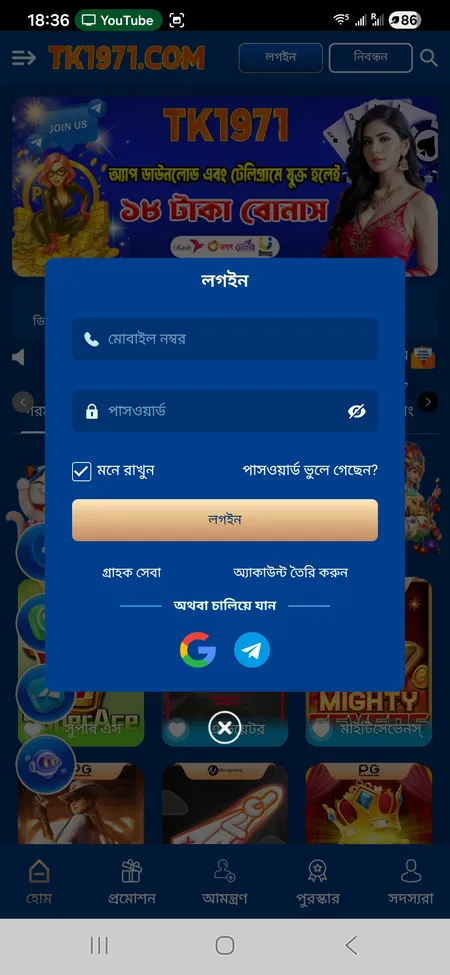
TK1971 login form with phone, password and social sign-in

Login screen: mobile number field, password field, Remember Me, Forgot Password link, and Google plus Telegram quick-access buttons.

Step-by-Step Sign-In Process

Follow these steps every time you access your account on desktop or mobile browser:

  1. Open tk1971game.com or any active mirror domain.
  2. Tap লগইন in the top-right corner. The login popup appears instantly.
  3. Enter your registered Bangladeshi mobile number in the first field.
  4. Type your password in the second field. Passwords are case-sensitive.
  5. Tick মনে রাখুন if you are on a personal device and want your session saved.
  6. Press লগইন. The platform verifies credentials and loads your dashboard in seconds.

If you registered via Google or Telegram, skip steps 3-4 and tap the corresponding button instead. The OAuth flow redirects you back to TK1971 automatically after you confirm access.

After a successful login you land on the home feed with your balance, VIP level and the full game catalogue visible.

Go to TK1971 Login Page

Signing In Through the Mobile App

The Android APK is not available on Google Play. Download it directly from the TK1971 app page or via the Telegram channel. Once installed, the app login screen mirrors the website form but is optimised for small screens.

Key app-specific features after login:

  • Biometric unlock - enable fingerprint or Face ID after the first successful password login. On subsequent sessions, a single touch or glance replaces typing.
  • Push notifications - the app sends alerts about match results, bonus credits and withdrawal status directly to your home screen.
  • Persistent session - the app keeps you logged in between uses unless you manually tap লগআউট (Logout) or clear app data.
  • Faster load - cached assets mean the game lobby opens roughly 30-40% quicker than the mobile browser version.

iOS users can add the optimised web app to their home screen as a PWA shortcut, which behaves like a native app with the same login flow.

One TK1971 account works across the website, all mirror domains and the Android app. You do not need separate credentials for each platform.

How to Recover a Forgotten Password

If you cannot remember your password, use the পাসওয়ার্ড ভুলে গেছেন? (Forgot Password) link on the login screen. The recovery flow sends a verification code to the mobile number linked to your account.

Steps to reset:

  1. Click Forgot Password on the login popup.
  2. Enter the mobile number you used during registration.
  3. Request an OTP. The SMS arrives within 1-2 minutes.
  4. Enter the OTP in the verification field.
  5. Set a new password. Use at least 8 characters mixing letters and numbers.
  6. Confirm and log in with the new credentials.

If you cannot receive SMS (sim card changed, number inactive), contact 24/7 support via Telegram, WhatsApp or the on-site chat. The support team can verify your identity through your Member ID and account history and manually reset access. Resolution is typically within 2-5 minutes according to platform statements.

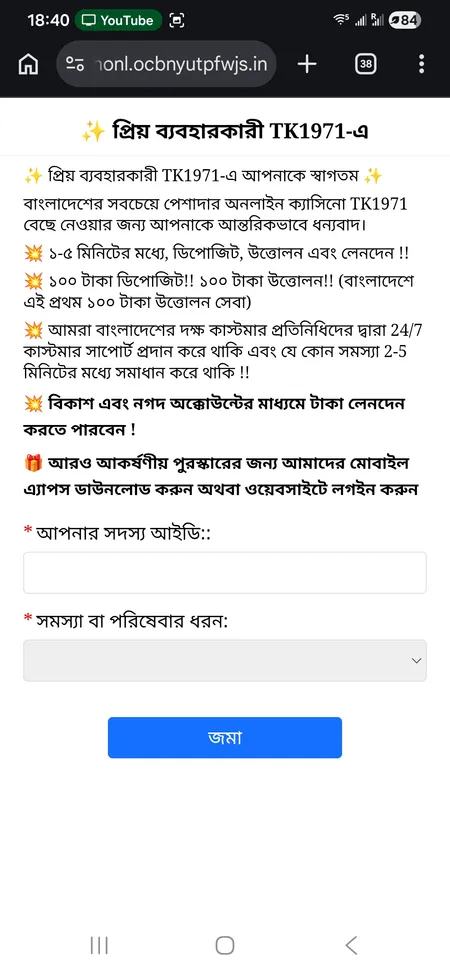
TK1971 support page for login recovery help

The support form accepts your Member ID and problem type - use it for password recovery if SMS does not arrive.

Contact Support

Two-Factor Authentication and Account Security

TK1971 recommends enabling 2FA after your first login. When active, every new device login requires a one-time code in addition to your password. This prevents unauthorised access even if your password is compromised.

Security measures the platform applies by default:

Feature Details
SSL encryption All data between browser and server is encrypted in transit
One account per player Same IP, phone or payment method cannot hold multiple accounts
Transaction password A separate PIN (লেনদেন পাসওয়ার্ড) is required before any withdrawal
Antifraid monitoring Unusual login patterns trigger additional verification
Session auto-logout Inactive sessions are terminated to protect open devices

Practical tips for keeping your account safe:

  • Use a password you do not use on other sites.
  • Avoid logging in on shared or public Wi-Fi networks.
  • Never share your OTP or transaction password with anyone - TK1971 support will never ask for these.
  • If you lose your phone, contact support immediately to freeze the account.

TK1971 enforces a strict one-account policy. Creating duplicate accounts on the same device, IP address or with the same payment method is treated as fraud and can result in account closure and balance forfeiture.

What You Can Access After Login

Once signed in, the full platform opens. Here is a quick overview of what becomes available:

Section What you get
Game catalogue 24,000+ slots, live tables, sports, fishing, poker, lottery
Deposit (জমা দিন) bKash, Nagad, Rocket, Upay - minimum BDT 100
Withdrawal bKash or Nagad e-wallet, BDT 100-25,000 per transaction
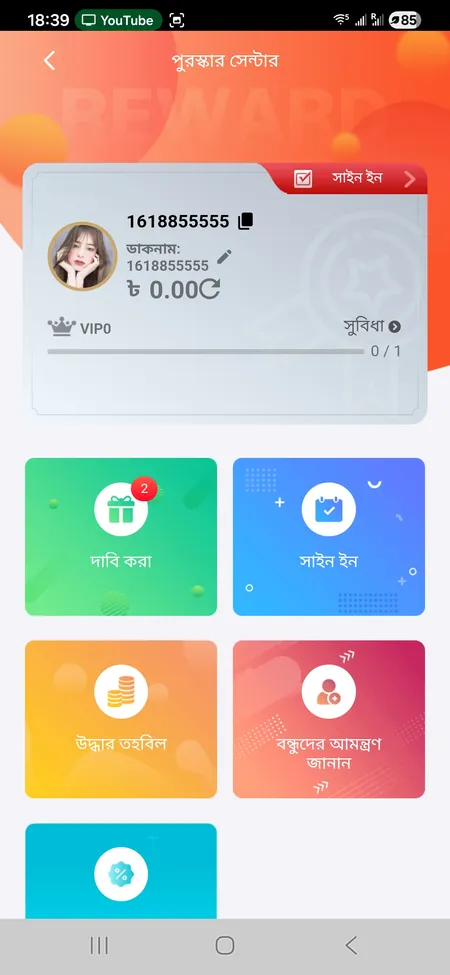
Reward Center Daily sign-in bonus, Recovery Fund, Claim section
VIP dashboard Current level, upgrade progress, weekly and monthly bonuses
Betting Record Full history of wagers, deposits and withdrawals
Invite Friends Referral link, commission tracker, tier rewards

Your Member ID and VIP level display at the top of the account panel. You can also upload a custom avatar or choose from the classic set in the same screen. All personalisation settings are saved to the server, so they appear consistently across devices.

Visit the TK1971 home page to explore the full game library and current promotions right after logging in.

TK1971 Reward Center after login

The Reward Center is the first place to check after signing in - claim daily bonuses, recovery funds and referral rewards here.

Open TK1971 and Claim Rewards

Troubleshooting Login Problems

Most sign-in issues fall into a handful of categories:

  • Wrong password - check Caps Lock, try copy-pasting the password to confirm there are no extra spaces.
  • Unregistered number - make sure you are using the same mobile number you entered during registration, including the country code if required.
  • Account locked - after multiple failed attempts the system temporarily locks access. Wait 15 minutes or contact support.
  • Outdated app version - delete the old APK and download the latest version from the official site.
  • Browser cache conflict - clear cookies and site data, then try again in a private/incognito window.
  • Mirror domain blocked - if one domain does not load, try an alternative such as tk1971.org or tk1971hub.com. All mirrors share the same login credentials.
  • OTP not arriving - check network signal and spam folder; if the issue persists, use the support chat for manual verification.

Support is available 24/7 in both Bengali and English through Telegram, WhatsApp and the online chat widget. Stated response time is 2-5 minutes for common login issues.

Login FAQ

Which mobile number do I use to log in?

Use the Bangladeshi mobile number you entered during registration. The format should match exactly - no country code prefix unless you added one at signup.

Can I log in with Google instead of a phone number?

Yes. If you created your account using the Google option during registration, tap the Google button on the login popup. You will be redirected to Google and then back to TK1971 automatically.

What happens if I enter the wrong password several times?

After multiple failed attempts TK1971 temporarily locks the login form. Wait about 15 minutes before trying again, or contact 24/7 support via Telegram to unlock access faster.

How do I stay logged in on my phone?

Tick the 'Remember Me' checkbox before pressing Login. On the Android app, your session persists automatically until you tap Logout or uninstall the app.

Is there a transaction password separate from the login password?

Yes. TK1971 uses a dedicated transaction password (লেনদেন পাসওয়ার্ড) for withdrawals. This is set separately from your login password and adds an extra security layer.

Can I log in on multiple devices at the same time?

One active session per account is the standard. Logging in on a second device may end the first session. The system flags suspicious multi-device behaviour as a security measure.

My registered SIM is lost. How do I recover my account?

Contact 24/7 support via the on-site chat or Telegram. Provide your Member ID and any available account details. The team can verify identity through betting history and manually reassign your account to a new number.

Where is the logout button?

Open the side menu (hamburger icon), scroll to the bottom of My Account section and tap লগআউট (Logout). This ends your session on that device only.

Does the login page work on iOS?

Yes. The web version is fully optimised for Safari on iPhone. You can also save the site as a home screen shortcut for a near-native app experience with the same login credentials.

What is the link between login and KYC verification?

You can log in and play immediately after registration. However, withdrawals above certain thresholds require completed KYC - your name in the profile must match the name on your bKash or Nagad account.

Ready to access your TK1971 account? Sign in now and check your Reward Center for today's available bonuses.