TK1971 Official App — Mobile Access

The TK1971 mobile app gives Bangladesh players direct access to 24,000+ games, live casino tables, cricket betting and instant BDT payments via bKash and Nagad. The APK is not available on Google Play - you download it directly from the official site. Setup takes under two minutes, and your account works identically on both the app and the browser version.

Why the app beats the browser version

TK1971 on mobile loads games faster because the APK caches core assets locally instead of fetching them every session. Push notifications alert you to new promotions, Ramadan events and live match updates in real time. Biometric login (fingerprint and Face ID) replaces typing your password on a small screen. The interface switches to Bengali by default and shows your BDT balance front and center. One login works across the app and any mirror domain, so your history, VIP level and bonuses stay synced.

When you download the TK1971 app and also join the official Telegram channel, the platform credits your account with an 18 BDT welcome bonus automatically - no coupon code needed.

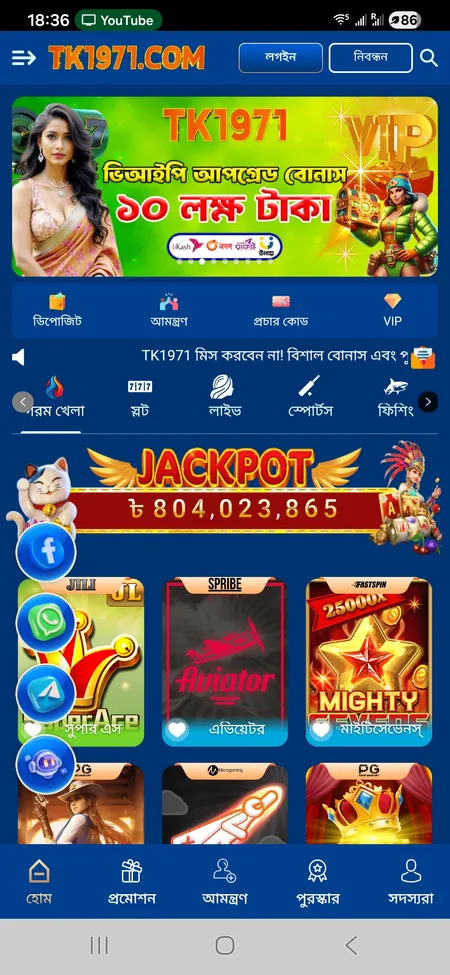
TK1971 app home screen with games and jackpot

The app home screen shows the live jackpot counter, quick deposit button, VIP tier and game categories in Bengali.

How to download the TK1971 APK on Android

Google Play does not host real-money casino apps for Bangladesh, so TK1971 distributes its Android build as a direct APK file. Here is exactly what to do:

  1. Open tk1971game.com or tk1971.org in your mobile browser.
  2. Tap the Android download button on the app banner.
  3. When the APK file lands in your downloads folder, open it.
  4. Android will prompt you to allow installation from unknown sources - go to Settings > Security > Install unknown apps and enable it for your browser.
  5. Tap Install and wait about 20 seconds.
  6. Open TK1971, log in with your mobile number or register a new account.

File size is roughly 30-40 MB. A stable mobile connection (4G or Wi-Fi) prevents a corrupt download. If the install fails with an error about the package, delete the file, clear your browser cache and download again from the official domain only - never from third-party APK repositories.

Get the TK1971 APK

Android installation in four steps

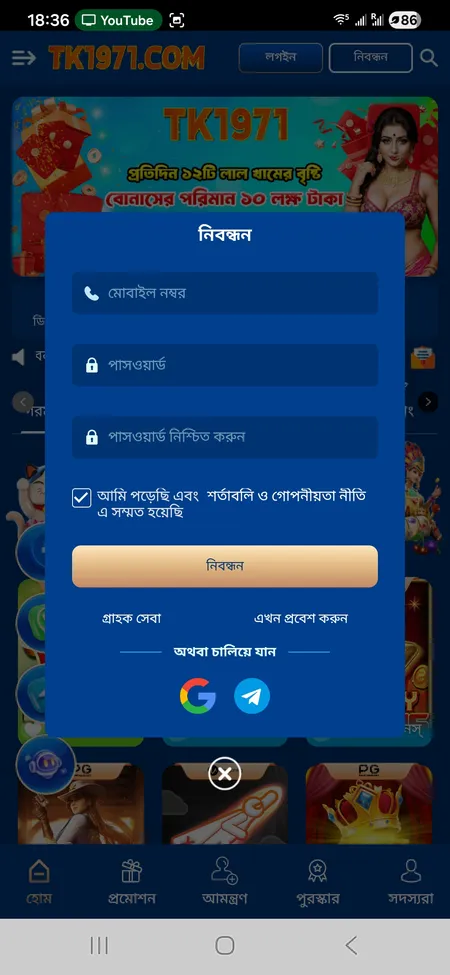
  1. TK1971 registration form on mobile

    Step 1 - Open the official site. Go to tk1971game.com in Chrome or any browser. Tap the Download App banner at the top of the page.

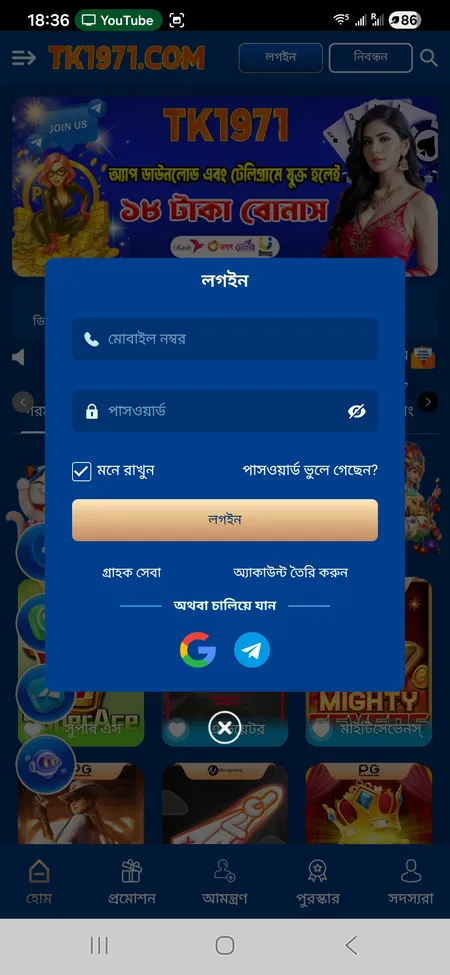
  2. TK1971 login screen with phone and password fields

    Step 2 - Download the APK. The file downloads automatically. Check your notification bar for the download progress.

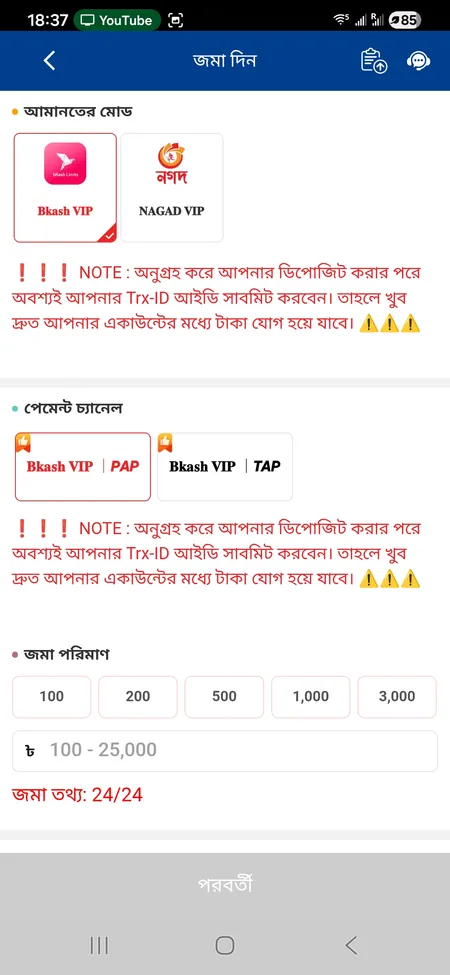
  3. TK1971 deposit form showing bKash and Nagad options

    Step 3 - Allow unknown sources. Android blocks installs outside Play Store by default. Enable the permission for your browser in Settings > Security.

  4. TK1971 home screen after successful login

    Step 4 - Install and log in. Tap the APK in your downloads, confirm install, then sign in with your registered mobile number and password.

Installing on iOS

Apple's App Store does not list TK1971 either. iOS users have two practical options:

Progressive Web App (PWA): Open tk1971game.com in Safari, tap the Share icon, then choose Add to Home Screen. The icon appears on your home screen and behaves like a native app - full-screen mode, cached assets, no browser chrome.

Corporate profile / IPA build: If TK1971 releases a signed iOS build, the download page will show an iPhone button alongside Android. Tap it, confirm the profile installation under Settings > General > VPN and Device Management, then open the app. iOS may show a trust warning - follow the on-screen steps to verify the developer profile.

The PWA route requires no extra permissions and updates automatically when the site updates. It is the fastest option for most iPhone users in Dhaka and Chittagong.
Both Android and iOS users log in with the same credentials. Your VIP level, wallet balance and betting history are identical across the app, PWA and any browser session.

System requirements

Platform Minimum requirement
Android Version 6.0 or higher
iOS Version 13.0 or higher
Free storage 60 MB minimum
RAM 2 GB recommended
Internet 4G LTE or stable Wi-Fi

Most smartphones sold in Bangladesh since 2018 meet these requirements. Low-end devices may experience slower lobby loading but core gameplay and payments work normally.

Visit TK1971 official site

Bonuses you get through the app

The app is the main channel for TK1971's mobile-specific rewards. After downloading and linking your Telegram account you receive 18 BDT immediately. Your first deposit of 100 BDT unlocks a rebate bonus up to 82%, bringing the total welcome package to 100 BDT in bonus funds. Wagering requirement is 10x, valid for slots only.

Inside the app you also access:

  • Daily Sign-In reward in the Reward Center
  • Dream Wheel spins (VIP1 and above get 1 to 10 spins per day depending on level)
  • Member Carnival Day every Wednesday - free bonus based on VIP and activity
  • Red Envelope Rain - 12 daily envelopes worth up to 10 lakh BDT total
  • Recovery Fund for sessions with losses

The TK1971 VIP program runs from VIP1 to VIP31. At VIP1 you need 1,000 BDT in effective bets. At VIP10 the cumulative upgrade bonus alone reaches 3,000 BDT plus weekly and monthly salary-style payouts.

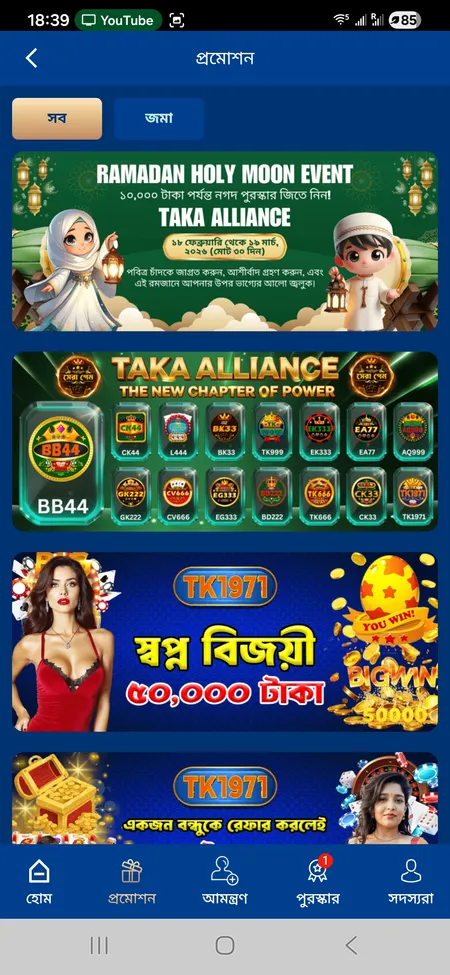
TK1971 promotions screen showing Ramadan and Dream Winner bonuses

The promotions screen inside the app lists all active offers including the Ramadan Holy Moon Event and the 50,000 BDT Dream Winner daily draw.

Games available on mobile

The TK1971 app gives access to the full 24,000+ game catalog without restriction. Categories load from the bottom navigation bar:

Category Providers
Slots JILI, PG, Pragmatic Play, NetEnt, FC, Spribe
Live Casino Evolution, Sexy Casino, Ezugi, PP Live, Ezugi
Sports betting 9 Wickets, SABA Sports, FB Sports, IA E-Sports
Crash games Aviator by Spribe
Fishing JILI, JDB, CQ9, Joker
Poker JILI Poker, Kings Poker, Baison Poker
Lottery Available under dedicated tab

Cricket markets are the most popular section among Bangladeshi players - you can bet on domestic T20 matches, IPL and international series with live odds updates.

Explore the full list on the TK1971 game catalog page.

Deposits and withdrawals in the app

All payments in TK1971 use BDT. The deposit form is one tap away from the home screen button labeled Deposit (জমা দিন).

Method Min deposit Min withdrawal Processing time
bKash VIP 100 BDT 100 BDT 1-5 minutes
Nagad VIP 100 BDT 100 BDT 1-5 minutes
Rocket 100 BDT 100 BDT 1-24 hours
Bank transfer varies varies up to 24 hours

After sending money via bKash or Nagad, you must enter the Transaction ID (TrxID) in the deposit form - the system will not credit your account without it. Maximum per transaction is 25,000 BDT; you can make up to 99 withdrawals per day.

For withdrawals you link up to five e-wallets and set a transaction password separately from your login password.

TK1971 deposit screen with bKash and Nagad options

The deposit screen shows bKash VIP and Nagad VIP channels with preset amounts of 100, 200, 500, 1000 and 3000 BDT.

Never send money to a phone number or Telegram account claiming to be TK1971 support. All deposits go through the official deposit form inside the app or website only.

Download the TK1971 app, complete registration and claim your 18 BDT welcome bonus today.

Security and account protection

The TK1971 app uses SSL encryption for all data in transit. The platform recommends enabling two-factor authentication (2FA) on your account settings. Biometric login (fingerprint or Face ID) adds a hardware-level lock so no one can open the app even if they have your phone unlocked.

Key security rules:

  • One account per player per mobile number, IP address and payment method
  • Using the same phone or IP for multiple accounts is treated as fraud and leads to account suspension
  • Personal data requests outside official channels (Telegram, live chat, email) are always scams
  • Recovery of a forgotten password goes through 24/7 support - never through unofficial links

Updating the app

Because TK1971 APK is sideloaded, there is no automatic update from a store. When a new version is released the app shows an update banner on the home screen. Tap it to download the latest APK from the same official domain and install it over the existing version - your account data and balance remain intact. No full uninstall is needed for standard version updates. iOS PWA users receive updates automatically when they open the app in Safari, since the PWA pulls fresh assets from the server.

FAQ

Where do I download the TK1971 APK?

Go to tk1971game.com or tk1971.org and tap the Android download button. Do not download from third-party APK sites - only the official domain is safe.

Why is TK1971 not on Google Play?

Google Play does not allow real-money casino apps for most markets including Bangladesh. The official APK from the TK1971 website is the correct installation method.

How do I install the APK on Android?

Download the file, go to Settings > Security > Install unknown apps, enable the permission for your browser, then tap the downloaded file and choose Install.

Can iPhone users install the app?

Yes. The easiest method is the PWA: open tk1971game.com in Safari, tap Share and choose Add to Home Screen. If a signed IPA is available, the iPhone button appears on the download page.

Is the 18 BDT bonus automatic after downloading?

Yes. Download the app and join the official TK1971 Telegram channel. The 18 BDT bonus is credited to your account without a promo code.

What is the minimum deposit in the app?

The minimum deposit is 100 BDT via bKash or Nagad. The same 100 BDT minimum applies to withdrawals.

Does my account work on both app and website?

Yes. One login covers the app, PWA and any browser session. Balance, history and VIP level are always synced.

What should I do if the APK installation fails?

Delete the downloaded file, clear your browser cache, and download again from the official site. Make sure you have at least 60 MB of free storage and that unknown sources is enabled in your security settings.

How do I update the TK1971 app?

When an update is available the app shows a banner. Tap it to download the new APK from the official site and install over the existing version. No uninstall required.

Is 2FA available in the TK1971 app?

Yes. The platform supports two-factor authentication. Enable it in your account security settings for an extra layer of protection alongside biometric login.